Home › Forums › Help and Support › Weird issue about my calibration. Need Help!
- This topic has 9 replies, 3 voices, and was last updated 5 years, 6 months ago by
Ali Emre Alici.
-
AuthorPosts
-
2020-12-06 at 15:40 #27178
Hello,
With my old PC, my measurement report had no weird value and I was using with no problem.
I had a new system recently, new OS. Installed DisplayCAL 3.8.9.3 and started calibration. I ‘m getting weird Contrast value at my all test and unstable gamma table at report. At my old system, I was getting 750-850 Contrast and my gamma table was stable. Now I’m getting 350-370 Contrast.
Using all default settings, only I’m setting to 6500K and Correction file. Like I did with my old PC. I have tried to move calibration device to different spots on monitor. Tried to re-adjust device several times. Tried different Gamma modes in monitor.
I don’t know what’s happening but I always getting low contrast reports and unstable gamma. Is it calibration device failure? I have been troubleshooting since morning and I’m going crazy.
Gamma report table. It’s all over the place. It wasn’t like that before.

My measurement report in attachment.
-
This topic was modified 5 years, 6 months ago by
 Erdo4.
-
This topic was modified 5 years, 6 months ago by Erdo4.
-
This topic was modified 5 years, 6 months ago by Erdo4.
Attachments:
You must be logged in to view attached files.2020-12-07 at 12:13 #27200I had a new system recently, new OS.
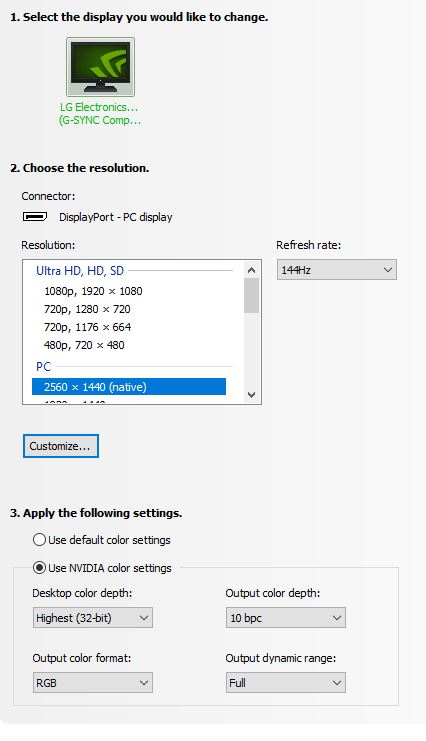
HDMI configured as limited range? Check it.
2020-12-07 at 12:18 #272012020-12-07 at 12:35 #27205No change on OSD values? Can you check range on display OSD?
Try to disable calibration and re-measure. You can use console log “check uncalibrated display” which is faster.
Or try with a USB “live CD” and measure from another computer (remote measurement) if you cannot get an ArgyllCMS to work on unzipped executables (no system install).
If contrast keeps at 300:1 after these tests then it is caused by HW or GPU range level, not calibration related.2020-12-07 at 12:57 #27206I have LG 27GL850 and there is no color range option in OSD.
I have tried several times recalibrating again and again. Ofc I have deleted current preset first before doing it.
2020-12-07 at 13:03 #27207Test what I said so you can discard both calibration & driver settings.
2020-12-07 at 13:06 #27208Is there a easy way to do what you said since I have no idea how to do it, beginner here. Sorry 🙂
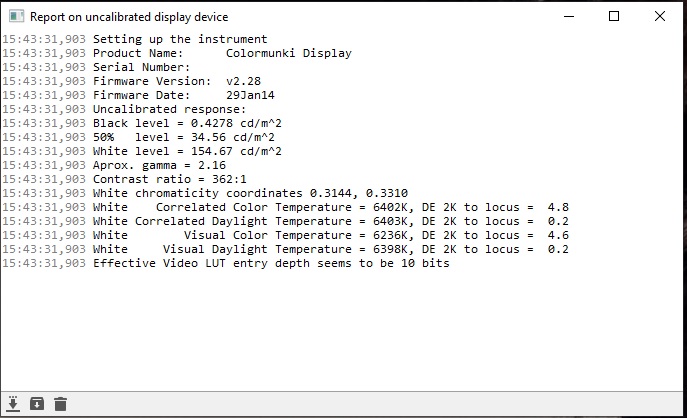
2020-12-07 at 13:47 #27209I just checked “Report uncalibrated display device”. That also gives very low contrast value. As you said this is not related to calibration afaik but what would cause this?
 2020-12-07 at 14:14 #27210
It’s unlikely but I have to write it.
I’m using vertical gpu kit which uses extension cable and I recently changed my dp cable to original. (dp 1.4)
Should I remove it for just the sake of test or is it just not it?
What should I try before getting another calibration device to test it? It’s unlikely that device broke after a little of time.
-
This reply was modified 5 years, 6 months ago by Erdo4.
2020-12-07 at 16:25 #27213Donanımhaber erdo is that you?
-
This topic was modified 5 years, 6 months ago by
-
AuthorPosts