- This topic has 0 replies, 2 voices, and was last updated 6 years, 2 months ago by
 .
.
Viewing 2 posts - 1 through 2 (of 2 total)


Viewing 2 posts - 1 through 2 (of 2 total)
Home › Forums › Help and Support › Measurement failed – Instrument sensor is in the wrong position
Kely.Hello,
Device: colormunki photo on windows 8.1
I’ve successful created a profile and used for years, and I want to do a new calibration, but I couldn’t launch the calibration because it failed by saying “The measurement failed because the instrument sensor is in the wrong position. Please correct the sensor position, then click OK to continue.
The driver was ok, and the light on my colormunki photo blinked once, I am sure that the sensor was in the right position since i’ve done it.
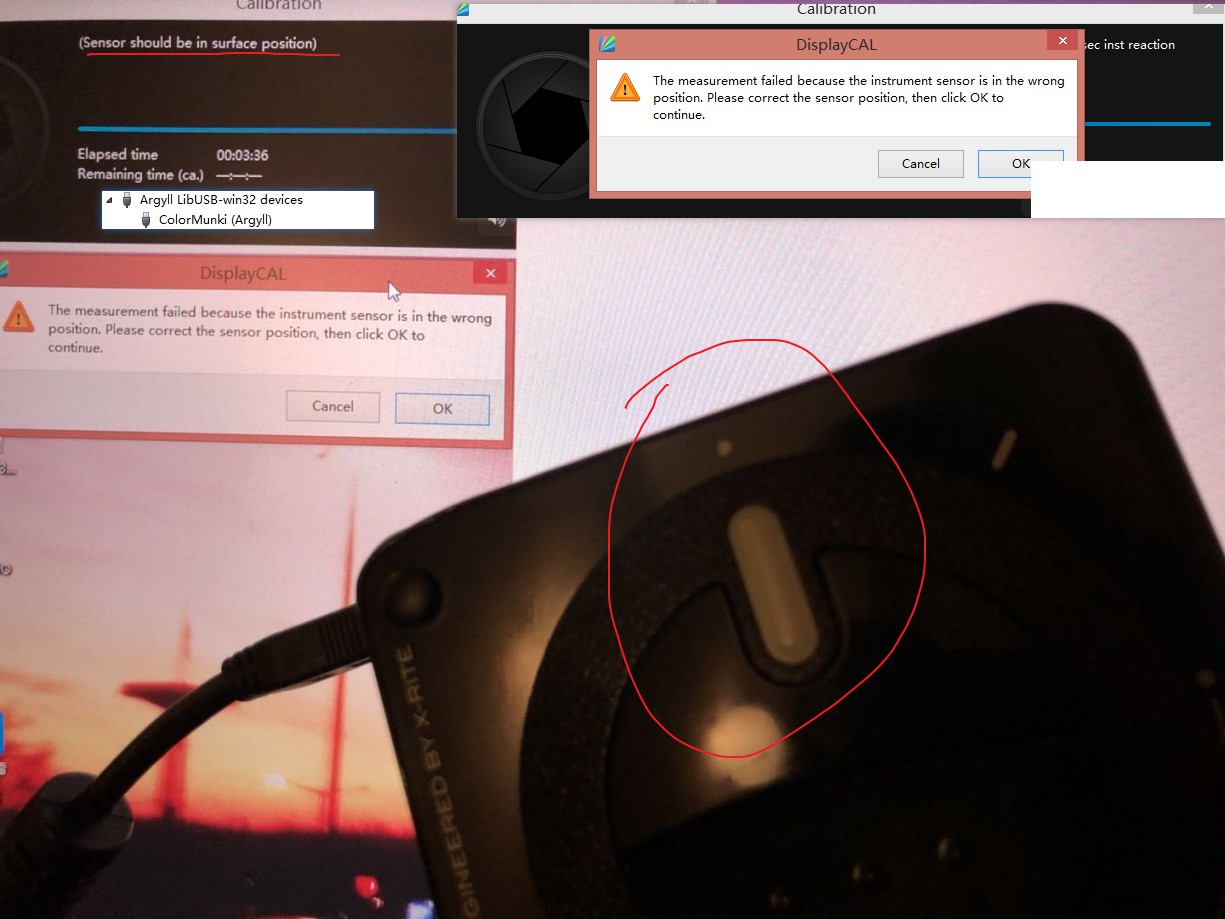
So far, i’ve changed USB 3.0 to 2.0, changed USB cable, reinstall the driver, different version of DisplayCal, everything i could think of, and there’s no answer to this kind of problem on Google neither.
Here’s the log info.
18:32:27,144 Place instrument on test window.
18:32:27,147 DisplayCAL: Waiting for send buffer
18:32:29,392 DisplayCAL: Sending buffer: ' '
18:32:29,394 Hit Esc or Q to give up, any other key to continue:
18:32:32,040 , using delay of 200 msec & 0 msec inst reaction
18:32:32,293 Patch 1 of 3
18:32:32,293
18:32:32,295 Spot read failed due to the sensor being in the wrong position
18:32:32,296 (Sensor should be in surface position)
18:32:32,299 DisplayCAL: Waiting for send buffer
18:32:35,839 DisplayCAL: Trying to end subprocess gracefully...
18:32:35,871 DisplayCAL: Sending buffer: '\x1b'
18:32:35,872 Correct position then hit Esc or Q to give up, any other key to retry:
18:32:35,874 The instrument can be removed from the screen.
18:32:36,009 dispread: Error - dispd->read returned error code 1
18:32:36,010
Any information that you need, please do not hesitate to ask.
Kind regards,
Calibrite ColorChecker Studio on Amazon
Disclosure: As an Amazon Associate I earn from qualifying purchases.
I also have the same problem on Linux.