Home › Forums › Help and Support › Few questions about gamma, madvr and profiling
- This topic has 13 replies, 2 voices, and was last updated 8 years, 9 months ago by
 Florian Höch.
-
AuthorPosts
-
2017-08-01 at 22:14 #8125
AnonymousInactive- Offline
Hi,
I’ve been asking myself a few questions for a long time… Hope I’ll get some answers.
1 | We can create some LUTs with different settings from a single profile. Why can’t we create multiple profiles the same way ? I’ve read somewhere that we need to do a new profiling run. Is it true ? I’d like to create a second profile with a different gamma, it would be nice to use the previously collected data. Is it possible ?
2 | Can somebody explain me how Black Input Offset works ? I know what effect it has on blacks, but I don’t understand how exactly the curve is scaled.
3 | When I launch a report on a non-calibrated display, the 10-15 samples are all white. Is it normal ?
4 | Is it okay to create a BT.2020 LUT for madvr using a sRGB profile ?
5 | I’ve always done 3dlut files with the 3Dlut maker, but does the madvr output gives better results ?
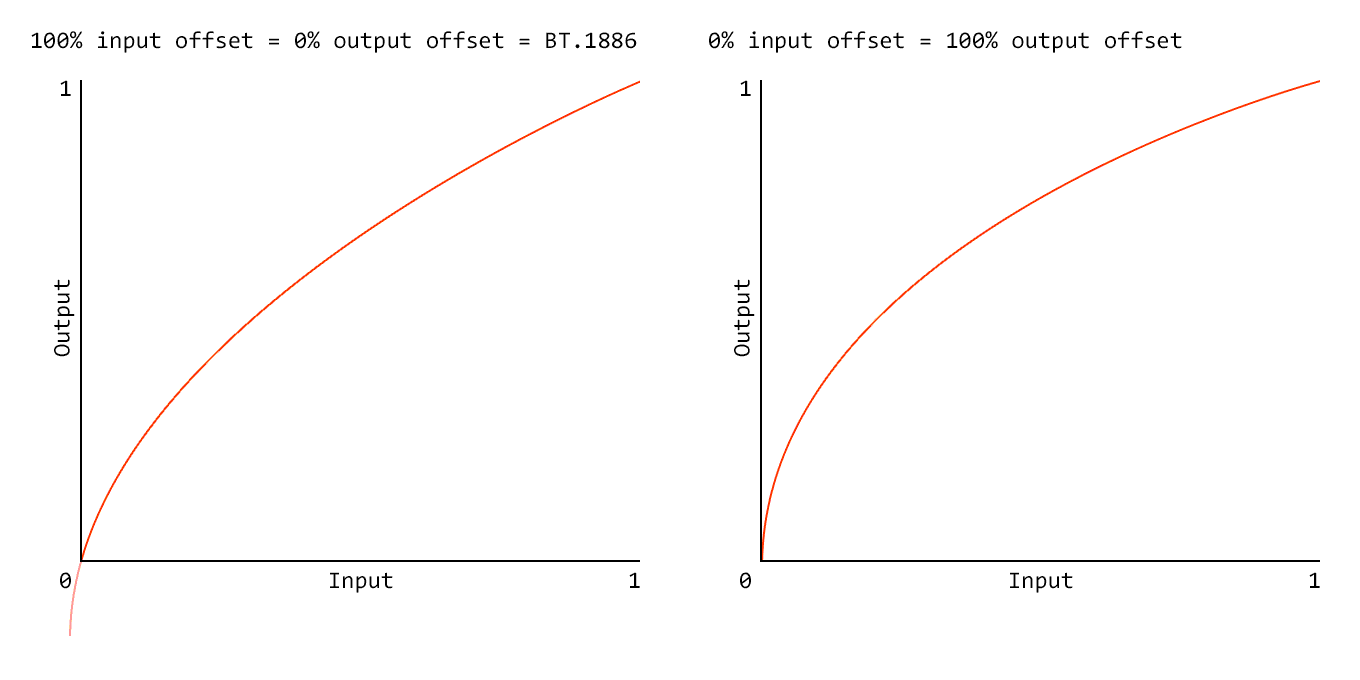
4 | On those two graphs below, a 2.4 gamma with 100% black output offset VS BT.1886 curve. If monitor’s black level was 0, BT.1886 curve would be a straight line at 2.4. So how BT.1886 is supposed to be better ? In my opinion, first curve looks closer to an ideal 2.4 gamma. Anyway, I always thought the blacks looked washed out with BT.1886 or output offset < 100%.

 2017-08-01 at 22:29 #8139
1 | We can create some LUTs with different settings from a single profile. Why can’t we create multiple profiles the same way ?
A profile is just a characterization of the display in its current state. There is no need to re-profile unless the display state changes (i.e. if you deliberately make adjustments via its controls, or if the display drifts time).
2 | Can somebody explain me how Black Input Offset works ? I know what effect it has on blacks, but I don’t understand how exactly the curve is scaled.
Lets’ assume you’re targeting gamma 2.4 and your display has a black level of 0.1 cd/m2. That means the input to the ideal gamma 2.4 curve (which starts at a black level of absolute zero) will be scaled so that it gives the display black level. See below.
3 | When I launch a report on a non-calibrated display, the 10-15 samples are all white. Is it normal ?
Sorry, I don’t understand the question?
4 | Is it okay to create a BT.2020 LUT for madvr using a sRGB profile ?
What do you mean by “using a sRGB profile”?
5 | I’ve always done 3dlut files with the 3Dlut maker, but does the madvr output gives better results ?
I don not understand this question either.
4 | On those two graphs below, a 2.4 gamma with 100% black output offset VS BT.1886 curve. If monitor’s black level was 0, BT.1886 curve would be a straight line at 2.4. So how BT.1886 is supposed to be better ?
“Better” is a subjective term and more related to personal preference than anything. With BT.1886 and a display with a black level above zero, the curve raises out of black quicker, maintaining detail near black.
2017-08-02 at 1:05 #8147
AnonymousInactive- Offline
Thank you and sorry for my bad english.
The graph is great, now I understand !
A profile is just a characterization of the display in its current state.
OK, so how can I modify settings, such as gamma or white point without taking new measurements ?
3 | When doing a report on uncalibrated display device, the samples shown on the screen are all white… I’m curious about that.
2017-08-02 at 12:44 #8155OK, so how can I modify settings, such as gamma or white point without taking new measurements ?
Adjusting the display requires reprofiling.
3 | When doing a report on uncalibrated display device, the samples shown on the screen are all white… I’m curious about that.
I’m pretty sure it’s light gray, and is a way to test the videoLUT bit depth.
2017-08-02 at 13:06 #8157
AnonymousInactive- Offline
Alright, thank you.
Adjusting the display requires reprofiling.
I don’t adjust display settings anymore. Now I keep R=G=B=100 in the OSD of my monitor and let the profile correct everything. I found that banding has been greatly improved that way. So I could switch between different profiles without problem.
2017-08-02 at 13:23 #8159I don’t adjust display settings anymore.
Adjusting gamma (doesn’t matter wheter via OSD or via videoLUT through 1D calibrtation) is adjusting display settings.
2017-08-02 at 15:03 #8165
AnonymousInactive- Offline
OK, but through the 3Dlut maker, I can, for example, set the Gamma to 2.4 while the target profile is 2.2… So I’m still quite confused about all of this. Do you know any good book about color management ?
2017-08-02 at 15:13 #8166Color management always involves a transform from a source space into a destination. The destination’s gamma or whitepoint does not matter at all, only thing that matters is that the destination is accurately profiled. The source is usually some synthetic space like Rec. 709 with BT.1886 tone response, for example. A 3D LUT is just a “baked” form of such a transform. When you alter the gamma (tone response) for creating a 3D LUT, you’re altering the source space tone response. When you’re altering the 1D calibration tone response, you’re altering (essentially) the display response and this only affects non color managed parts of the system (i.e. under Windows almost everything, under Mac OS X almost nothing).
2017-08-02 at 17:59 #8173
AnonymousInactive- Offline
Ok now I get it, thank you very much.
By the way, I noticed some mistakes in the french translation. Is it possible to help ?
2017-08-02 at 18:01 #8175By the way, I noticed some mistakes in the french translation. Is it possible to help ?
Sure, the translation files are in the “lang” subfolder in the application directory.
2017-08-03 at 12:37 #8182
AnonymousInactive- Offline
Thanks, I started working on it.
Florian H., I’ve thought about our talks. Just to be sure that I understood you correctly, am I right if I say that :
– The calibration changes the LUT 1D to match the custom settings
– Then, the profiling record the display response with that LUT loadedThank you again.
2017-08-08 at 10:15 #8215– The calibration changes the LUT 1D to match the custom settings
– Then, the profiling record the display response with that LUT loadedCorrect.
2017-08-15 at 15:38 #8378
AnonymousInactive- Offline
Translation is almost done. But I’m stuck on those two options :
– Override display settle time multiplier
– Override minimum display update delayI suppose it’s about input lag, refresh rate, sensor speed etc. But I’m not sure about anything. Could you please tell me what they do ?
Since I’m not just filling the blanks but also improving badly translated parts, I need to fully understand every functionality.
Thank you in advance.
2017-08-15 at 16:20 #8382A display needs a specific time to “settle” after a change in displayed content. The minimum display update delay on the other hand is the minimum amount of time a display needs to do a complete screen update.
-
AuthorPosts

