Home › Forums › Help and Support › Confusion about color managment
- This topic has 22 replies, 6 voices, and was last updated 1 year, 7 months ago by
 Vincent.
-
AuthorPosts
-
2020-06-07 at 18:31 #24998
I noticed it in last auto-update a few days ago, to 77.0.1, but I do not remember my base version. It was working properly untill then.
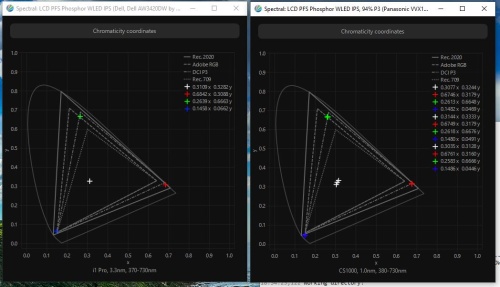
2022-04-04 at 17:34 #34982Vincent, I’m about to make a new calibration for my AW3420DW, and I was wondering about corrections: Spectral: LCD PFS Phosphor WLED IPS , Dell AW3420DW by 4KM for newDP (i1 Pro) user made, or Spectral: LCD PFS Phosphor WLED IPS, 94% P3 (Panasonic VVX17P051J00 in Lenovo P70). The monitor covers ~92% P3, and sRGB 99,8%.

-
This reply was modified 4 years, 3 months ago by
 S Simeonov.
-
This reply was modified 4 years, 3 months ago by S Simeonov.
2022-04-05 at 2:38 #34986I believe Vincent would answer: use Panasonic PFS CCSS. Because the green is closer to P3 than Adobe RGB, that’s why Panasonic is a good match vs. other PFS CCSS, and higher resolution than the user correction(with less spikey spectra user corrections can be trusted more).
But you can start interactive calibration. Is the white point close between each correction? If yes you can be confident.
2024-12-22 at 14:55 #142610According to rthings.com they increased the contrast during calibration of AW3420DW. I’ll attach screenshot from their review, is that necessary, i mean could it help?
 2024-12-22 at 15:13 #142611
Normally OSD contrast is left at default unless there is some issue. I don’t know why Rtings changed it.
2024-12-22 at 15:24 #142613Normally OSD contrast is left at default unless there is some issue. I don’t know why Rtings changed it.
Are their reviews trustworthy?
2024-12-22 at 16:10 #142614Normally OSD contrast is left at default unless there is some issue. I don’t know why Rtings changed it.
Are their reviews trustworthy?
Probably their data is correct. It’s prudent to verify data with other reviewers. Reviews can’t tell you about manufacturing variations or if the manufacturer sent a special sample.
2024-12-22 at 16:16 #142615By looking at RGB gains, no one left at 100%, either they were negligent using them, so they pushed contrast in OSD trying to restore it (which would act on “internal” RGB gains somehow)… or they do it properly because display show some weirdness keeping one at 100%, like some near “RGB 25x” cliping.
IDNK if they explained it in text.Normally OSD contrast is left at default unless there is some issue. I don’t know why Rtings changed it.
Are their reviews trustworthy?
Rtings pre & post calibration report is useless.
pre cal report assumes errors vs D65 and D65 grayscale, instead of evaluating white alone vs D65 and the grayscale against actual white (like DisplayCAL). So if WP error is too high, it’s very difficult to know if grey has some a* axis tint. = potential buyer won’t know about QC in grayscale out of the box… which is the typical issue it’s hard to correct without a measuremnet device, while wrong whitepoint can be fixed visually.
post cal report is using “ICC” setting on calman UI. This is close or equal to DIsplayCAL’s “use simulation profile = sRGB” but “use simulation display as display profile = UNCHECKED”. They are testing if after “profiling display” (without any VCGT grey calibration) and applying color mamagenent they could emulate sRGB.
Typical rtings reader will think that after calibration display resembles sRGB, but it’s false.
If you download rtings profile you’ll see that it’s a matrix, 3x TRC without any kind of grey calibration in VCGT.their RGB gains can be use as a guide, but otherwise pretty useless those two report.
-
This reply was modified 1 year, 7 months ago by Vincent.
-
This reply was modified 4 years, 3 months ago by
-
AuthorPosts