Home › Forums › General Discussion › [Report] I stop using absolute gamma and I’ll use the 2015 10 deg observer
- This topic has 12 replies, 4 voices, and was last updated 4 months, 1 week ago by
Robi Mihnea.
-
AuthorPosts
-
2026-02-28 at 23:19 #145501
So I was watching TV in the living room and I wanted to compare the picture with my OLED monitor. (I can access to TV via internet.) I noticed that the OLED monitor was less gray in the shadows and highlights were brighter. I took a screenshot tried to simulate an imperfect black using GIMP level tool. Then I noticed grayish black, it’s tautological. Then I used the curve tool to simulate a relative gamma. The result was seamless.
So why do we have to stick to CRT when they had the flaw of imperfect blacks too ? Right now OLED blacks must be the reference. It’s time to move on and unlearn the BT1886 in its default black input or output offset. I’ll use 0 percent input offset (or 100 percent output offset if you use displaycal). I’ll use the 2.2 defacto gamma as day setting. I could use 2.4 too, I gonna have to see the light level in the room on midday. I can target 2.3 and I guess it’s the most rational choice in an uncontroled environment. For now I leave behind the BT1886 EOTF as I want my TV to reproduce colors like they are in reality. I don’t care about details visibility if they are not realistic.
I also measured my colorchecker with my I1Pro 2 and I compared the adjusted to lighting conditions 2015 10 deg calibrated OLED monitor colors and the real colorchecker. Sometime I can clearely tell if a calibration is wrong, but here I can only say that the magenta hue was there because I have a QD-OLED monitor. -_-‘ I made some shadows on the displayed patches and colors matched. Even the low light patches. So I’ll use this observer without any afterthought. I’ll check colors when I’ll get a RGB stripes tandem OLED monitor. The colors are too close that I’m thinking that the meter is at fault or that Windows ACM makes some imprecisions or I didn’t use enough profiling points.
2026-02-28 at 23:37 #145502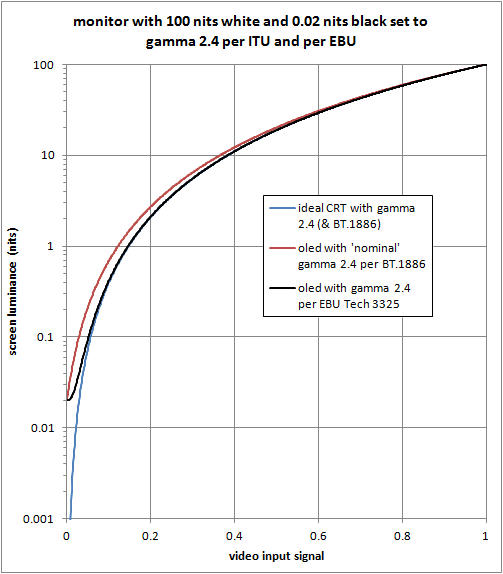
If you want to follow ideal CRT gamma, you have to use a relative 2.4 gamma. The BT1886 doesn’t follow the ideal CRT curve above 0.1 nit.
2026-03-01 at 17:04 #145503The title and the message are contradicting each other.
Gamma is absolute when it comes to 0 – the blue line. Monitors with a non-zero black using gamma as the target will try to get as close to the gamma as possible – the black line.
BT1886 is relative to the measured black – the red line. But OLEDs have zero black, making BT1886 is the same as gamma 2.4 for them.
So which case are you now using? Are you lifting the OLEDs black to 0.02 then crashing the following blacks to keep up with gamma?
Regarding colors on the QD-OLED, just use perceptual matching. Gives better results than any alternate observer.
2026-03-01 at 22:51 #145505Watching tv that was encoded with BT1886 for output to the tv. BT1886 is a standard. The color is not the gamma. Your color volume and xyz coordiantes of color tell if you have true color. You can see a little bit with a color check on a cie xy chart. HDR would need a hdr chart. I believe in color ramps and using tv red green and blue filters. https://www.avsforum.com/threads/avs-hd-709-blu-ray-mp4-calibration.948496/ . If you do not have a spectrometer your eyes can adjust the brightness and saturation and guess what it needs with a colorimeter.
2026-03-01 at 23:47 #145506In fact power law is tagged as relative and BT1886 is tagged as absolute. Source : https://www.mediafire.com/folder/laajc8n7eat85/Displaycal_Absolute_and_relative_gamma
I know I was confused too but it has been labeled like this.
So I’ll set to 2.2 BT1886 0 percent black input offset in HCFR for the LCD TV. I want a faithfull representation of reality and absolute can’t bring this on the table. Having differences between monitors is not the goal of calibration.
I remember that when I watched Dune 2 in theater shadows were stronger and highlights were brighter. I have to set a low dynamic contrast to reproduce this quality. (The white point is DCI-P3 instead.)
I’ll stick to my methodology for the observer. It works. I will try to calibrate my portable OLED monitor so I can check the accuracy of the observer. I’m confident that the result will be accurate. I just need to take the time to do it. I’ll turn off the light to compare the QD-OLED and the AMOLED one.
Also I miss DWM LUT so much… I ironically managed to make an inverse tone mapping technic to make everything HDR and widen the color space without making colors other saturated or weird. Q_Q
-
This reply was modified 4 months, 3 weeks ago by
 Guillaume.
2026-03-01 at 23:54 #145508Also I miss DWM LUT so much… I ironically managed to make an inverse tone mapping technic to make everything HDR and widen the color space without making colors other saturated or weird. Q_Q
Also I miss DWM LUT so much… I ironically managed to make an inverse tone mapping technic to make everything HDR and widen the color space without making colors over saturated or weird. Q_Q
-
This reply was modified 4 months, 3 weeks ago by Guillaume.
2026-03-02 at 23:52 #145510HCFR 2.2 bt1886 and 0 input offset is 2.2 Relative gamma or relative gamma. It is confuseing useing Display Cal terms and HCFR terms. Display Cal saying absolute 2.4 for bt 1886 means black output offset is 0 for displaycal. 100 input offset in HCFR with bt1886 is they way bt 1886 is supposed to be for no black crush on a non 0 nit black screen. It increases the black greys relative to the black background so it stands out more.
As long as your goal in calibration in right. I believe all screens are different contrast levels so they need to be different to look the same. If they same contrast then it should not matter if calibration is relative the 0 point brightness.
2026-03-03 at 11:24 #145511In fact when I had a TN monitor, I used the BT1886 and I needed to see how a photo looked like and I retouched it, it looked good. I watched it with my VA panel BT1886 calibrated and the photo looked very dark. I just looked at it with my QD-OLED and it is even more dark. So the BT1886 doesn’t give the right information.
I know HCFR/Displaycal labelisation differences but your clarifications are welcomed because a new comer will not be lost.
As for the QD-OLED colors I used a tube to isolate the displayed colorchecker patches and colors were the same as reality with 2015 10 deg CMF when the monitor matched lighting conditions. So I’ll stay with it. I just need to do a E illuminant profile in order make a 2015 10 deg aligned to CIE 1931 matrix. I’ll share this matrix and that will be the final version of it.
-
This reply was modified 4 months, 3 weeks ago by Guillaume.
2026-03-03 at 13:49 #145513Good work. Very complicated getting the calibration right. If you want them all to look the same they have to be done by eye. Makeing the black point the same on the oled would make them look the same but then why have a oled if your not useing a very near 0 nit 0 rgb. Photos are fine to use gamma 2.2 on . Not sure what gamma video cameras are set at. Keep your original footage. A copy of a copy of a copy is not as good as the original.
2026-03-03 at 17:12 #145514In fact the graph was found here : https://www.liftgammagain.com/forum/index.php?threads/ebu-tec3320.5681/
This graph is from an EBU paper. My OLED monitor black is set at 0 nit.Normally REC709 video cameras follow the REC709 encoding curve. If I remember correctly.
By the way, do you have a spectro ? If yes, you can use it with HCFR and make a colorimeter correction with it. You gonna have to set the ref and the colorimeter one to CIE 2012/2015 10 deg. It’s not that hard. Then you can use any CCMX and copy/past the matrix. I past one I did so you can see what I did.
CCMX
DESCRIPTOR “i1 DisplayPro, ColorMunki Display & AOC Agon Pro AG276UZD 2012 10”
INSTRUMENT “X-Rite i1 DisplayPro, ColorMunki Display”
MANUFACTURER_ID “AOC”
MANUFACTURER “AOC”
OBSERVER “2012_10”
REFERENCE_OBSERVER “2012_10”
DISPLAY “AG276UZD”
TECHNOLOGY “QD-OLED”
DISPLAY_TYPE_BASE_ID “1”
DISPLAY_TYPE_REFRESH “NO”
REFERENCE “I1 Pro2”
REFERENCE_HASH “md5:e4ca4b2d17ec8b36c99af27f66d8828c”
TARGET_HASH “md5:ed0e2de550871a76a74fa7edabf840fd”
FIT_METHOD “ΔE*00”
FIT_AVG_DE00 “0.242857”
FIT_MAX_DE00 “0.600000”
FIT_AVG_DE94 “0.285714”
FIT_MAX_DE94 “0.600000”
ORIGINATOR “HCFR THC”
CREATED “2025”
COLOR_REP “XYZ”NUMBER_OF_FIELDS 3
BEGIN_DATA_FORMAT
XYZ_X XYZ_Y XYZ_Z
END_DATA_FORMATNUMBER_OF_SETS 3
BEGIN_DATA
1.036748 -0.022047 -0.005005
0.048415 0.945583 0.006995
-0.038860 0.038309 1.015411
END_DATAIt works flawlessly. Just target xy : 0.3138 0.3313 as white point. Forget the BT1886 0 percent output offset, use 100 percent.
https://www.mediafire.com/view/xcplpoyj7x44urf/BT1886_0_percent_input_100_percent_output.png/file
Even with a black at 0.5 nit the curve is adjusted.Calibrite Display Pro HL on Amazon
Disclosure: As an Amazon Associate I earn from qualifying purchases.2026-03-03 at 21:34 #145515Based on the formulas of various EOTFs
Attachments:
You must be logged in to view attached files.2026-03-04 at 0:56 #145517Me , I do not have a spectrometer. I do not have a good budget either. I did get more hours to work. My display is not worth a spectrometer. The built in color gamut is closer to rec 601 than to rec 701. The chc file is for hcfr 3.5.4.2 . Do not load while doing a calibration. It might change your settings. I think everything is set fine. My profile is a linear 1dlut and I did calibration in HCFR and then had display cal measure the black point and the white point and make a profile only. It does better when you manually measure the black point and white before makeing the profile.
I have started from scratch and recalibrate the monitor without changeing the profile. I lower 100red to -3 instead of 0 or -2 I forget. I lowered green 100 to be closest to 100 red but not over and made red match green. Blue has no control points that are good since it is -50 on its offsets. -50 matches the lowest part with the 100 mark of the display with no gamma white balance on a its 20 point controls at default 0. It default color temp is above 9300 and green is 20 short but can raise it 20 and get 200 extra contrast and a really green brightness of to high in HCFR. All the offset are then at 0 and and all 20 control points are correct.
-
This reply was modified 4 months, 3 weeks ago by
Ben.
Attachments:
You must be logged in to view attached files.2026-03-14 at 16:16 #145556Hi
As many of you on the Canary and Dev channels have noticed, the original DWM LUT (by ledoge/laurex) has been broken due to internal changes in dwm.exe in the latest builds.
I’ve spent the last few days reverse-engineering the new offsets and I’ve successfully revived the project. I’ve refactored the DLL injection logic to ensure compatibility with the current 24H2/25H2 architecture.
Key Updates in this fork:
Fixed memory offsets for 26xxx+ builds.
New UI: Native Dark Mode support for the GUI.
Refactored Code: Improved stability and reduced overhead during injection.
Open Source: You can audit the code or build from source.
I’m a long-time lurker here and I know how much people rely on 3D LUTs for system-wide calibration (especially for those of us with OLED panels).GitHub: zkipp/dwm_lut_fixed
Feel free to report any bugs if you’re on even newer builds. I’ll do my best to keep the offsets updated as Microsoft releases new versions.
– zkipp
-
This reply was modified 4 months, 3 weeks ago by
-
AuthorPosts

