Home › Forums › Help and Support › P3 D65 calibration
- This topic has 13 replies, 3 voices, and was last updated 1 year, 4 months ago by
 Vincent.
-
AuthorPosts
-
2025-03-09 at 0:42 #143216
Hi there !
I think I really need help understanding how to calibrate my display in P3 D65.
I’m working on davinci resolve with an Eizo monitor CG279x with an integrated probe The monitor has the a DCI P3 D65 profile in it. This is my reference monitor, where I display my full screen image though a Blackmagic Ultrastudio monitor card. I guess this display is “accurate”. My primary display is a Dell U3223QE , this is the display I use for the work (where my color wheels are etc.. ) I would like this display to have the same ( approaching) colors of my Eizo. So my thought is that I must find a way to set it in Gammut DCI P3 D65. (The specs of the display says that it covers 98% of DCI P3 color space. )Is there a way to calibrate it to the cover the same gamut as my Eizo ? (Dci p3 D65) and how ? (There is a P3 D65 preset inside the monitor, but it is super bad)
When I try to calibrate it with Xrite i1 and Displaycal I never get a good result, image is always very different as what my Eizo shows. ..and the Average and maximum profile self check values are way too far from where they shoud be !!
I used this video to calibrate https://youtu.be/6xNU5YTDUOo and tried with or without resolve. I also read this topic https://hub.displaycal.net/forums/topic/dci-p3-space-calibration-with-displaycal/ But I do not understand everything (My english is not super good) and it does not help me.In displaycal I put DCi P3 D65 in the “source colorspace” of the 3D lut section.. But
I tried to do an icc profile, I also tried to do a lut and put it in a lutbox before my Dell Display , but I never get good results.I’m sure that i’m not understanding something (or many things) , Please can someone explain me please ?
Thank you and sorry for my english
2025-03-09 at 1:43 #143217Update : I understand that calibration sets up white point, brightness and gamma and does not sets up the gamut.
During the calibration process i must setup my display R and G and B and brightness values using OSD but is it obligatory ? I mean on my OSD I can choose DCI P3 but in that case I cannot change R G B and brightness. SO what would be the best OSD setting to calibrate it in DCI p3 please ?2025-03-09 at 21:43 #143222Setting the Dell into Custom Color (or similar) should put the panel into the native gamut (close to P3) and also allow you to adjust R/G/B.
Adjusting R/G/B from the monitor is not obligatory, but can produce better results than the software only approach.
If you don’t have a good enough spectral correction for your specific panel in order to get decent calibration measurements, your best bet is to perceptually adjust R/G/B to visually match your other display’s white.
2025-03-10 at 0:27 #143228Resolve can handle color management so no need to limit your display in OSD to something.
Let’s assume that your project is P3 D65, Eizo is c`propelry calibrated and that stuff.1- Profile Dell in custom color mode to same white & brightness as Eizo. That Dell is likely to be WLED PFS phsophor regarding correction for colorimeter.
If matching them numerically has some visual mismatch , apply an additional visual match to Dell, If done this way let0s matk it as (*).
Usually you want to profile Dell with a 3d mesh (XYZLUT profile) but you OS if MacOS may complain about this.2-Create a LUT3D from (source) P3 D65 and whatever gamma you have in your project & Eizo, to (destination) Custom XYZLUT profile made for dell.
If you wish to keep system wide gamma/grey calibration in Dell (by display profile set as default in OS settings), uncheck apply VCGT.3-Load LUT3D in Resolve for that GUI viewers.
Remember that some miniatures are not color managed in Resolve, although most viewers are.
For Rec709 you’ll do the same.
-
This reply was modified 1 year, 4 months ago by Vincent.
2025-03-10 at 0:30 #143230Setting the Dell into Custom Color (or similar) should put the panel into the native gamut (close to P3) and also allow you to adjust R/G/B.
Adjusting R/G/B from the monitor is not obligatory, but can produce better results than the software only approach.
If you don’t have a good enough spectral correction for your specific panel in order to get decent calibration measurements, your best bet is to perceptually adjust R/G/B to visually match your other display’s white.
DaniJ approach is true too, due to “the native gamut (close to P3)”, but as a general rule for an unknown gamut of a widegamut display, gamut limitation is done through LUT3D in resolve as explained above. Even systemwide using DWMLUT f you are on Windows.
2025-03-10 at 10:44 #143237@vincent @DaniJ Thanks a lot for your replies, this helps a lot in my way of understanding how all that works
Concerning point 1 – OK i understand, and yes I’m on osx, but i’ll use a lutbox for that monitor
2- To be sure i understand well I choose DCI-P3/SMTPE-431-2-D65 for Source colorspace in the 3D lut menu of Displaycal, and XYZ Lut in Profile type (I’m not sure to understand what you mean by Custom XYZLUT profile made for dell.)
3- Applying a lut in “color viewer lookuptable” in resolve does not change anything . (I tried when Dell connected to mac viua USBC or via my lutbox ->it is a blackmagic bidirectionnal SDI HDMi converter )
As I understood well DanJ’s approcah is good but only for P3 because it is the wider gammut. It won’t work for rec709 right ?
2025-03-10 at 21:40 #143240If you are on macOS, you should use “use mac profiles” on a simple single curve matrix profile fro GUI and let blackmagic card deal with eizo as reference display.
These dells should not be so bad bahaved a matrix profile cannot dexcribe them for GUI work.If you go for LUT3D, do not apply VCGT and on XYZLU porfile creation reuse your current 2.2-whatever gamma on macOS custim single curv matrix profile.
3- Applying a lut in “color viewer lookuptable” in resolve does not change anything . (I tried when Dell connected to mac viua USBC or via my lutbox ->it is a blackmagic bidirectionnal SDI HDMi converter )
If source is P3 D65 you should se almost equal as with no LUT3D! (excluding gamma). Dell natuve gamut is almost P3. Which points me to:
Let’s assume that your project is P3 D65, Eizo is c`propelry calibrated and that stuff.
So it’s not so crazy to think that your whole setup is wrong, including project configuration
Start with a Rec709 project since it’s easy to get RGBCMY 100% saturation patches and test color management visually or by measurement.
When you are able to do this using ONLY native gamut Dell monitor as GUI (no sRGB/Rec709 HW preset, only color management through ICC or LUT3D), you can move to P3.-
This reply was modified 1 year, 4 months ago by Vincent.
2025-03-11 at 11:22 #143242Thank you Vincent,
If you are on macOS, you should use “use mac profiles” on a simple single curve matrix profile fro GUI and let blackmagic card deal with eizo as reference display.
I’m sorry but I do not get it. My eizo has its own calibration probe and makes its own profiles. When I switch the color profile on my Eizo, it switches in Osx Display menu too. I guess I do not have to go on “use mac profiles” here : (and there is no “use mac profiles” in this menu .
And when I’m in davinci resolve, this goes through ultra studio card.
My problem for getting good colors is on my Dell display which is my primary display for GUI viewers.If source is P3 D65 you should se almost equal as with no LUT3D! (excluding gamma). Dell natuve gamut is almost P3. Which points me to:
Nothing happens for me when chosing a lut in davinci in “color viewer lookuptable” . Even if I put a lut with a big orange shift for example. It does not affect the colors at all.
So it’s not so crazy to think that your whole setup is wrong, including project configuration
No way !! haha; I guess my project configuration is right, i use manual color management with color space transforms and I’m sure my output is in p3 d65
Start with a Rec709 project since it’s easy to get RGBCMY 100% saturation patches and test color management visually or by measurement.
When you are able to do this using ONLY native gamut Dell monitor as GUI (no sRGB/Rec709 HW preset, only color management through ICC or LUT3D), you can move to P3.I calibrated my Dell in rec709 and it worked well , i had no problems with the Profile self check DeltaE*76 values.. But when trying to do it with p3 source in display cal my DeltaE*76 values were completly bad, this is why I guess there is something in DisplayCal that i do not understand :
I work since a long time in rec709, but now I have a project that needs p3d65 so I have no choice to make it work now.Thanks again for your help !
2025-03-11 at 11:25 #143243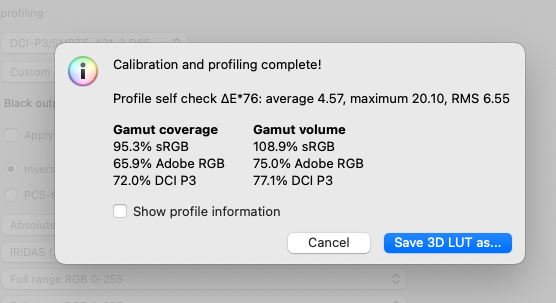 2025-03-11 at 11:31 #143244
This is my setups in displaycal : DisplayCal SETUP
2025-03-11 at 15:59 #143247Thank you Vincent,
If you are on macOS, you should use “use mac profiles” on a simple single curve matrix profile fro GUI and let blackmagic card deal with eizo as reference display.
I’m sorry but I do not get it. My eizo has its own calibration probe and makes its own profiles. When I switch the color profile on my Eizo, it switches in Osx Display menu too. I guess I do not have to go on “use mac profiles” here : (and there is no “use mac profiles” in this menu .
“use Mac profiles” in Resolve configuration is for GUI monitor using GPU that drivers your desktop, not for your reference monitor through a decklink.
And when I’m in davinci resolve, this goes through ultra studio card.
My problem for getting good colors is on my Dell display which is my primary display for GUI viewers.hence use mac profiles with a native gamut 2.2 single curva matrix… or a LUT3D
If source is P3 D65 you should se almost equal as with no LUT3D! (excluding gamma). Dell natuve gamut is almost P3. Which points me to:
Nothing happens for me when chosing a lut in davinci in “color viewer lookuptable” . Even if I put a lut with a big orange shift for example. It does not affect the colors at all.
So it’s not so crazy to think that your whole setup is wrong, including project configuration
No way !! haha; I guess my project configuration is right, i use manual color management with color space transforms and I’m sure my output is in p3 d65
Then you did LUT3D wrong (aka not matching settings). P3 D65 is not 2.6. From your screenshots you do nit match this colorspace
Start with a Rec709 project since it’s easy to get RGBCMY 100% saturation patches and test color management visually or by measurement.
When you are able to do this using ONLY native gamut Dell monitor as GUI (no sRGB/Rec709 HW preset, only color management through ICC or LUT3D), you can move to P3.I calibrated my Dell in rec709 and it worked well , i had no problems with the Profile self check DeltaE*76 values.. But when trying to do it with p3 source in display cal my DeltaE*76 values were completly bad, this is why I guess there is something in DisplayCal that i do not understand :
I work since a long time in rec709, but now I have a project that needs p3d65 so I have no choice to make it work now.Thanks again for your help !
Screenshot is not a calibration report. it’s a self test: measurement data vs profile data. That self report shows sRGB like profile or measurement data, like if something in your system is simulating sRGB or like if you switched modes in OSD. Disable Dell Display Manager and to not use it in auto mode.
A proper calibration report is done through “verification” tab and show where the errors are, hence where your configuratuion (displaycal or video editing app) fails: grey color, gamma, white, gamut (CIE a*b* plot)…
2025-03-11 at 16:07 #143248Also U3223QE is not an HDR display. It may accept HDR data in its input but just to map it to its SDR panel.
As with any other fake HDR displays HDR color management is done through “let whetever it is on monitor” or “LUT3D HDR to HDR” if data feed to monitor is actually direct HDR data or “LUT3D REC2020 SDR to native SDR” if HDR to SDR mapping is done in some software renderer (like madVR does) or “LUT3D HDR to native SDR” (although this is generally not used due resolution lost in LUT3D).
When using one of these “fake HDR” displays like this dell or that Eizo as “OS desktop” capable monitor (not through a decklink) not sure how macOS will handle it, likely to map desktop to SDR like Windows. It does it this way, any profiling attempt must be done through Resolve outout even as GUI.2025-03-12 at 23:26 #143284Thank you very much for all this informations
Then you did LUT3D wrong (aka not matching settings). P3 D65 is not 2.6. From your screenshots you do nit match this colorspace
In my case I have to color grade my project in P3 D5 with a 2.6 gamma.
Could you tell me what in the screenshots i did wrong exactly to match this colorspace ?2025-03-13 at 0:59 #143286Thank you very much for all this informations
Then you did LUT3D wrong (aka not matching settings). P3 D65 is not 2.6. From your screenshots you do nit match this colorspace
In my case I have to color grade my project in P3 D5 with a 2.6 gamma.
As long as your Resolve project settings matches that….
Could you tell me what in the screenshots i did wrong exactly to match this colorspace ?
If that is your target and you had configured it in Resolve then is OK. *IF* that is your target.
Anyway self profile diagnosis shows that TI3 file with measurements do not match the profile description (sRGB-like). This points to a set of possible misconfigurations explained on previous messages. Playing sample MP4 on several RGBCMY saturation stages (crated for that target colorspace) in Resolve with no LUT3D will show potential issues.
It seems not realted with DisplayCAL at all but with changing OSD or fake HDR modes or some OS level sRGB simulation, like use macOS profiles. Since it’s user and/or app misconfiguration is on your roof.
I’ll start disabling on monitor OSD any HDR feature and for example playing a 100% saturation P3 red/green static patch video on Resolve with your current configuration. If it’s rendered as sRGB with no LUT3D config at all (hence no component created by DisplayCAL)…you’ll see the error.
Or showing on DIsplayCAL profile info viewer the resulting profile and its boundaries to try to find out where some component in your system started behaving wildly.
ArgyllCMS profcheck shows self diagnosis errors in a 3D view:
“profcheck -v2 -k -w -h custom.ti3 custom.icc” where custom is your profile -
This reply was modified 1 year, 4 months ago by
-
AuthorPosts
