Home › Forums › General Discussion › is it wise to buy X-Rite i1 Display Pro Plus now in 2022
- This topic has 40 replies, 16 voices, and was last updated 1 year, 3 months ago by
 Christopher.
-
AuthorPosts
-
2023-12-16 at 12:04 #140128
Today, I purchased the Calibrite Display PLUS HL, but I found that I am unable to use it with DisplayCAL.
I have loaded Argyll_V3.1.0, but DisplayCAL still recognizes my device as an i1 DisplayPro. After clicking the
Calibrate & profilebutton, the Interactive display adjustment window remains stuck on “Setting up the instrument, please wait.”I’m not sure if this is due to a lack of support from DisplayCAL or Argyll. It’s also possible that I made a mistake during the operation, as I have previously installed the Calibrite Profiler.
Can anyone tell me some possible solutions to this problem?
I tried the 32-bit Argyll V2.3 on my own, and it is now working properly.
Calibrite Display Pro HL on Amazon
Disclosure: As an Amazon Associate I earn from qualifying purchases.2023-12-16 at 12:43 #140129Today, I purchased the Calibrite Display PLUS HL, but I found that I am unable to use it with DisplayCAL.
I have loaded Argyll_V3.1.0, but DisplayCAL still recognizes my device as an i1 DisplayPro.
All these devices are i1d3. ArgyllCMS offers full functionality to them ( = i1DisplayPro), including Colormunki display / i1displaystudio/display SL.
After clicking the
Calibrate & profilebutton, the Interactive display adjustment window remains stuck on “Setting up the instrument, please wait.”I’m not sure if this is due to a lack of support from DisplayCAL or Argyll. It’s also possible that I made a mistake during the operation, as I have previously installed the Calibrite Profiler.
Can anyone tell me some possible solutions to this problem?
Try 32bit Argyllcms with DisplayCAL.
Also try a simple & uncorrected “dispcal -r” or “-R” or even a “spotread” in free measure. That will be the test for ArgyllCMS support.
2023-12-16 at 16:21 #140132Today, I purchased the Calibrite Display PLUS HL, but I found that I am unable to use it with DisplayCAL.
I have loaded Argyll_V3.1.0, but DisplayCAL still recognizes my device as an i1 DisplayPro. After clicking the
Calibrate & profilebutton, the Interactive display adjustment window remains stuck on “Setting up the instrument, please wait.”I’m not sure if this is due to a lack of support from DisplayCAL or Argyll. It’s also possible that I made a mistake during the operation, as I have previously installed the Calibrite Profiler.
Can anyone tell me some possible solutions to this problem?
I tried the 32-bit Argyll V2.3 on my own, and it is now working properly.
Where did you find the V2.3 from? I’m having the same problem and I can only find the latest 3.1.0 anywhere, google doesn’t come up with anything
2023-12-17 at 13:09 #14013832 bit 3.1
2025-02-18 at 0:20 #143076If you only have one or two OLED is the upgrade justified and is there any chart comparing the HL with previous generations with regards to low light differences ?
Upgrade from what? It’s a straight up downgrade from a Calibrite Display Pro for a display that is less than 2000 nits peak white which is all OLEDs.
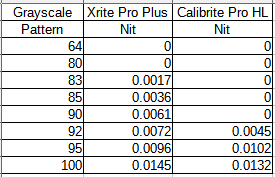
It stops reading around 0.004 nit vs 0.001 nit on the Calibrite Pro and Plus.
I’m brand new at all this and incredibly ignorant on the entire subject of calibration, software, terms, etc. so please bear with me.
What does this inferiority in low-light performance with the newest line of Calibrite colorimeters mean in the actual real-world rather than on paper with an OLED monitor?
Would this translate to less-dark blacks than the monitor can produce, ie. the very darkest blacks won’t be displayed/output by the monitor as black as the monitor is truly capable of?
…or…
Would it translate to darks being displayed/outputted by the monitor just as black as the monitor can produce BUT with “blown blacks” AKA “black crush” killing detail…for example: everything from “93% black” and above is actually being displayed/outputted by the monitor as full, 100% black?
…or, are both those incorrect?
Also, since this low-light level loss in performance is caused by the way the colorimeter was tuned (so that it could reliably sense higher brightness), that would mean the Plus HL would be even worse at low-light than the Pro HL since the Plus HL is “tuned” to 10,000 nits as opposed to the Pro HL’s 2000 nits, yes?
2025-02-18 at 2:14 #143079It means to set black to .005 nits. Thats really sad with a 2000 contrast ratio at 100 nits. But you can go to 800 nits and get 16000 contrast. Eyes can really only see about 1000 contrast. Sometimes more and sometimes less. I think you could set black to less but need a program to ignore below .005nits. Manually tunning it would be the best. There is basically no color at .005 so a little off would not matter. I do not think you spot the difference visually.
-
This reply was modified 1 year, 4 months ago by
Ben. Reason: getting rid of Rations used ratio
2025-02-18 at 20:32 #143086What does this inferiority in low-light performance with the newest line of Calibrite colorimeters mean in the actual real-world rather than on paper with an OLED monitor?
In practice not that much because:
- You can’t trust the color readings of the instrument that low anyway
- Even if you got good measurements, there’s not much you can adjust. It’s not like you can afford to increase RGB 1/1/1 to 5/1/4.
2025-02-19 at 23:46 #143087What does this inferiority in low-light performance with the newest line of Calibrite colorimeters mean in the actual real-world rather than on paper with an OLED monitor?
I’ve extensively tested the Pro HL and the Plus HL with an OLED display. Both probes performed the same: the gray calibration was almost always noticeably worse than with my i1 Display Pro Plus.
If you want a good device for calibrating OLEDs, you should buy one of the following probes:
- X-Rite i1 Display Pro/Pro Plus
- Calibrite ColorChecker Display Pro/Plus
You could also buy a NEC SpectraSensor Pro (MDSVSENSOR3), although this particular version of the i1 Display Pro is firmware-locked, so you won’t be able to use it with any software other than DisplayCAL/ArgyllCMS and NEC SpectraView II.
If you can’t get any of the above devices, the Calibrite Display SL might be worth giving a shot, although I haven’t tested it, so I have no idea how good (or bad) it is.
2025-02-20 at 8:51 #143088Numbers, tables, graphs, brightness error or color error, TV CMS vs autocal results… etc… on first hand comparisons please. This is not (should be not) DPReview.
2025-03-10 at 0:41 #143232What if you are calibrating OLED, does the previous iDisplay Pro as good as current generation ?
-
This reply was modified 1 year, 4 months ago by
-
AuthorPosts