Home › Forums › Help and Support › Help with getting correct calibration- Dell U2720Q
- This topic has 27 replies, 5 voices, and was last updated 9 months, 1 week ago by
Ben.
-
AuthorPosts
-
2025-10-04 at 14:54 #144790
Alessio needs a answer to his queasion. “Considering the monitor I have and the Resolve setting, how should I set displayCAL in the first and second windows (display & instrument | Calibration)?”
I think a new thread on the topic would be nice.
-
This reply was modified 9 months, 2 weeks ago by
2025-10-04 at 15:13 #144792Thanks again,
Forgive my stupidity, there are very few settings on this monitor; I honestly didn’t expect that.
Shouldn’t I normally use the RGB color space instead of YPbPr?
My graphics card drivers are up to date, although unfortunately I have a 1080TI, but I don’t understand what affects the graphics card if DeckLink handles the flow.
Furthermore, if I calibrate the monitor, to possibly change the individual RGB channels, I have to set “custom color” on the monitor, moving from “colorspace” where the “sRGB and P3” options are present. So, I don’t understand if I always leave sRGB when I set “custom color.”2025-10-04 at 15:46 #144793It is not a color space setting. It says “Input color format” . Input means signal. It is a wierd spot to put it in the monitor. YPbPr is yuv. Funny they use YPbPR since that is component signal but it has no component out. It is a HD signal type though. It carrys lumance and uses a formula to get color. RGB only carry 3 signals red, green and blue. I may wrong and simplified RGB. I did not look rgb up.
I did not check your monitor. It do not support 4k. https://www.dell.com/en-us/shop/dell-ultrasharp-27-monitor-u2724d/apd/210-bksf/monitors-monitor-accessories?msockid=2093aa203dee645308acbc1e3cb86521 . If your monitor works right make a new thread about resolve.
2025-10-04 at 15:47 #144794Those srgb and P3 options are emulations. Custom is what you want.
2025-10-04 at 16:04 #144795RGB vs YPbPr => whatever decklink cards needs. I’m inclined to day that RGB would meke things easier but I do not have a declink
Now regarding monitor, by spec, U2720Q is one of those 9x% P3 multimedia displays.
This means that if you feed RGB numbers encoded for sRGB/rec709 to this display in its native gamut things will look oversaturated.
You can:
-limit colospace inside monitor (sRGB/Rec709 preset, or custom color + 6axis limitation which won’t be easy for newbies) and then gamma/grey correct
-use color management to reencode rec709 content to display colorspace, by ICC or by LUT3D (like in your sitution).Low sRGB coverage in such monitor means that you are applying it twice. Somehow you have recstricted monitor response to ~sRGB and you may be applying a color management solution like if your monitor was P3-like but since display is behaving liek sRGB… you got undersaturation.
IDNK what you did so as I wrote earlier test each step in chain individually.
If display was set RGB input through HDMI to decklink, unplug in, plug it to your computer GPU and after checking HDMI levels mismatch measure its behavior.Regarding your last line, about presets:
sRGB = locked RGB gains for white, colorspace limited to ~sRGB, gamma/TRC expected to be ~sRGB (you cannot use it directly for video Rec709 g2.4 without grey calibration)
P3 =locked RGB gains for white, almost native colorspace and deepdning model maybe DCI-P3 white (greenish) or DisplayP3 (~D65)
Standard = locked RGB gains for white, native colorspace (~9x% P3), whitepoint “expected to be somewhereclose to” D65, gamma/TRC likely to be close to 2.2
Custom Color = native colorspace (~9x% P3), whitepoint “expected to be somewhereclose to” D65, gamma/TRC likely to be close to 2.2. Free access to RGB gains for white. Free access to 6axis HSL controls to limit colospace on 6 points (RGBCMY 255)
You can use whatever you like form these… but LUT3D created for one mode CANNOT be used in the others, you’ll have to make a custom one for each preset you want to use and configure your video editor/player to use the appropiate configuration every time you switch between OSD preset.Easiest one should be
-RGB input(dell)/output(decklink)
-Custom color preset (= NATIVE GAMUT), factory reset whatever you did, use RGB gains to fix white. Then let DisplayCAL create an ICC profile for neutral grey color calibration and measure the result and store it in an ICC profile (NATIVE GAMUT).
-Then use DisplayCAL to compute a LUT3D that re encodes typically Rec709 g2.4 content (SOURCE) to display in THAT state (DESTINATION), described by the custom ICC profile you created in previous step.
-Then load into your resolve project the LUT3D (there is a FAQ somewhere in DisplayCAL, I do not remember). Project settings \ color management \ video monitor lookup = your lut3D, color viewer lockup =your lut3d… but I do not use a decklink you you may need to place LUT3D somewhere else.Then load some sample videos with Rec709 CMYRGB 100% saturation test patches and you’ll see that 100% saturation test patch for green looks sRGB-like.
Run a validation to mkae sure that all things are OK.
Unsucessful validation with an small undersaturation and <600:1 contrast on a 1000 or 1500:1 static contrast ratio dislay is typically a signal of HDMI level mistmatch. Locate it (monitor? decklink?) and redo the whole process.
2025-10-04 at 16:13 #144797So if you got this after DIsplayCAL profile, before making a LUT3D:
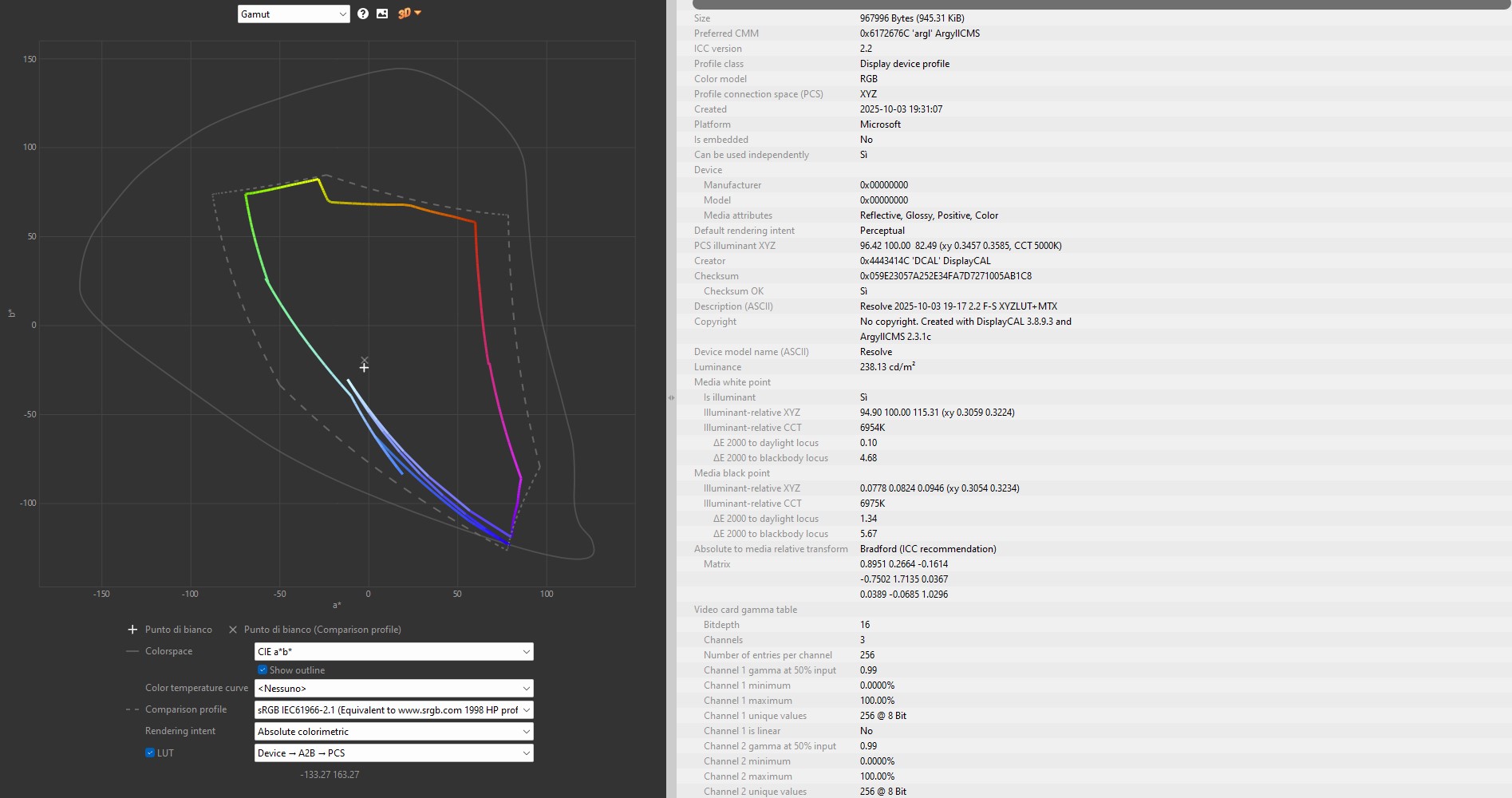
my 1st guess would be that you had configured some LUT3D in Resolve. It could be something else… but my 1st guess would be that.
You cannot have a LUT3D in resolve while calibrating/profiling displays because “whole monitor behavior” recorded by ICC profile wll be monitor behavior + OSD changes + external lutbox + software LUT3D running in Resolve. The whole pack applied in a chain would be “display ICC profile”, like if display have some hardware calibration memory.
If you make sure that there is no LUT3D on Resolve, that monitor is in custom color (=native gamut), et cetera, but display behavior recorded by DisplayCAL while profilling looks like that … then plug it to computer like a regular monitor, no decklink at all, RGB input, and measure here (HCFR, DisplayCAL, Calman… even command line) fo find who is making display behave like that, the decklink card or display. Then correct it if it is not a HW failure.
2025-10-04 at 16:39 #144800Thank you so much for all this information, truly so much. Unfortunately, I didn’t understand much of it, and I apologize for my ignorance. But I really can’t even understand the steps, and I’m very sorry to insist on abusing your availability.
Starting with point 1 of the tests I should do:
1. RGB input (dell)/output (decklink)
So, do I have to set the RGB on the monitor? But if I do, it turns all magenta, whether it’s connected to decklink or to the PC’s graphics card.2. When you say “Custom Color Preset,” are you referring to the monitor settings? When I calibrated, I obviously adjusted the individual RGB parameters based on the DisplayCAL measurement. But I didn’t export the ICC profile. After creating it, where do I upload it?
3. I’m not entirely clear on this.
4. I did exactly that, inserting the LUT into the color management for the external monitor, as shown in a video, and the result was completely wrong, a completely incorrect interpretation, magenta and yellow.
Thank you.
Attachments:
You must be logged in to view attached files.2025-10-06 at 23:24 #1448041 you need to run what runs your monitor. YCBCR or RGB. A monitor not doing RGB would be rare. The setting is there for RGB or the other. It does not have 4k so they can not say it has YCBCR. That a 4k format but is identical to the lower HD format they listed.
2. Only upload is for a 3d lut for a 3rd party tool to use it. Apply a profile loads the profile to windows profiles. The profile loader loads the lut in the profile. That is gamma and white correction. There is color information in the profile to. 3rd party apps can load the color info and make better colors.
3 is the 3d lut. It is advanced to use that. Did you enable advanced or find 3d lut in the calibrate options? You can make 3d luts after makeing a profile. It does not have to be the same time.
4. We do not know how to apply it to declink . What video do mean in your point 4? You followed someone’s how to video? Your picture does not come out yellow to me. It magneta and white. Your declink does not need a calibration so how to not feed it one is tricky. It assumes your video is linear gamma white balance in the icc profile. When your monitor is after declink declink does the calibration. You need to check with declink how to set it up.
2025-10-06 at 23:25 #144805The magenta could be from the wrong signal format to the monitor. And I think it is. No way would a calibration be that far off to make it all magneta.
Take baby steps. Get it to work without the card and then add the card.
-
This reply was modified 9 months, 2 weeks ago by
2025-10-07 at 19:44 #144811It does not have 4k
What are you talking about?
2025-10-07 at 23:32 #144821Alesio should be telling me if I am wrong. He should have started his own thread with specs. He never did give a monitor model number. His picture says Dell UltraSharp monitor. There is a difference in the PremierColor monitor and the non PremierColor monitor. His Declink does not do 4k 60hz so that could be the problem.
I tryed to help. He should have speak up and say it does work in 4k. Sorry I did not remember all he wrote. I think it did work in 4k with a certian setting in the monitor. I might have messed up. Sorry.
Wording drives me crazy. You should have said it might support 4k and I was wrong. Question my ability to talk drives me crazy. Your question means you do not understand me. I think you mean I was wrong.
-
This reply was modified 9 months, 2 weeks ago by
2025-10-09 at 10:43 #144830Hi Ben,
My monitor model is the same as the title of this thread, which is why I started commenting here.Dell U2720Q
and it supports up to 4K UHD (3840 x 2160 pixels).
Now, leaving aside calibration and LUT, as you mentioned, and taking it step by step, my first dilemma is:1. Which input color should I set, SRGB or RGB? (If I set RGB, it turns purple, whether the monitor is connected to the PC via the graphics card or via DeckLink), as shown in the attachments.
I’m starting to think this monitor has some issues.
Thank you as always.
2025-10-09 at 15:39 #144831RGB might mean RGB signal. It is the signal type from the graphics cards. Your declink supports signal types too. It does video signal links. PC signal type is RGB and Video is YCBCR. YBCBR is Lumance , Blue and Red. It subtracts Lumance from Red and Blue added to make Green. The lack of green makes it magneta.
Either will work with just the monitor but the declink I would have to try to see if it works in RGB. Your video card is set on ycbcr. Nvidia control panel screen resolution settings let you set the format.
I would use what works. Figure out how to set your video card up and your monitor.
-
This reply was modified 9 months, 2 weeks ago by
-
AuthorPosts

