Home › Forums › Help and Support › Dell U2720Q | Calibration
- This topic has 17 replies, 4 voices, and was last updated 7 months, 1 week ago by
Ben.
-
AuthorPosts
-
2025-12-10 at 19:47 #145106
One you generated the 3D LUT you need to apply it when verifying if it’s ok otherwise you’re just measuring the display’s state before calibration.
There are 2 ways to apply it:
- Have DisplayCAL read it from a device link profile. You did that as you selected “Device link profile” in your screenshot
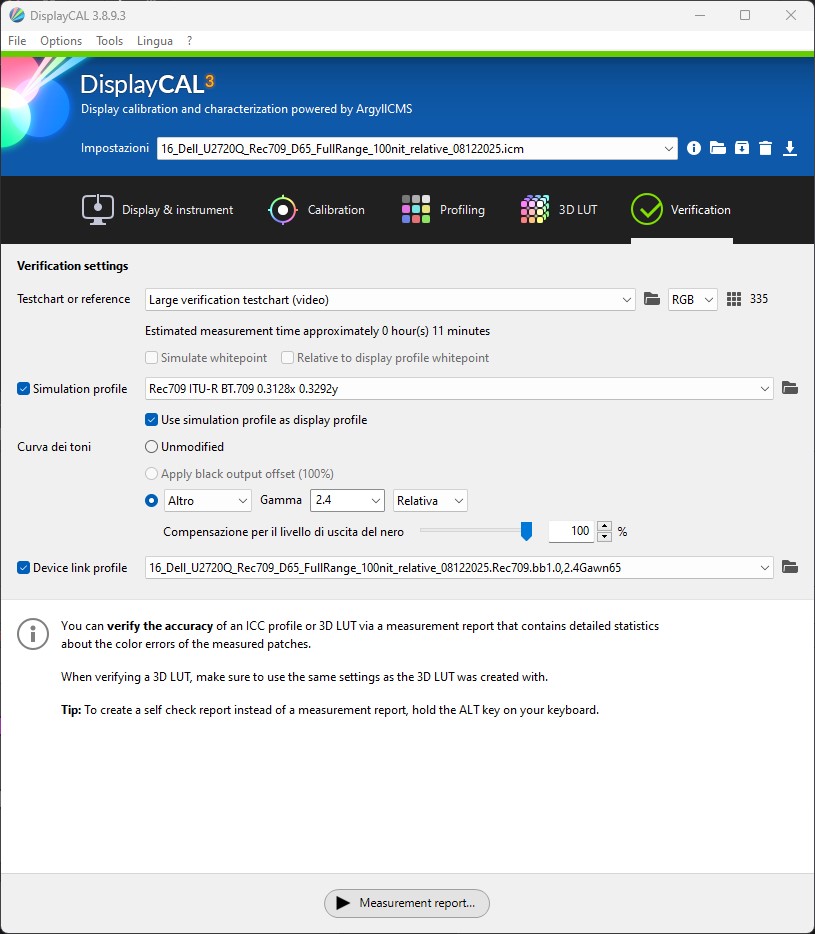
- Load the 3D LUT in Resolve. Recommended as you’ll be using this later anyway.
Only one option should be used as together you apply the correction twice. So just do a verification with the LUT loaded in Resolve.
In your first measurement report the LUT has probably empty/identity which is why no correction was applied even you if loaded both device link and Resolve.
2025-12-10 at 23:57 #145107Hi, thanks for your reply.
Excuse me, what is this I highlighted?Isn’t it the LUT loaded for the measurement?
I’m reporting what I did, I generated them for the exact same reason, loading the LUT in the “DEVICE LINK PROFILE”.
So I don’t understand when you tell me the LUT is probably empty…
Regardless of everything, I’m still asking if the displayCAL settings are correct.-
This reply was modified 7 months, 1 week ago by
Alessio Perisano.
-
This reply was modified 7 months, 1 week ago by
Attachments:
You must be logged in to view attached files.2025-12-12 at 21:16 #145111Resolve might have applyed the 3dlut and viewing a monitor connected to resolve is 3d calibrated if the lut is set. Resolve forum might be helpful. Not enough info on resolve settings to know if it is right. Video levels in displaycal match resolve? Resolve is in full in rgb since displaycal is. Your setting on verification to use simulated profile REC 709 uses rec 709 as target and unloads video card lut. This is right if resolve has the 3d lut applied to the screen. Hard to verify for me without testing. Testing and then see if its better with calibration is way to see if it is applyed. A test without resolve applying the 3d lut will show native response of the monitor.
In case above is wrong. I think you need uncheck use device link if useing resolve as display or else you apply the 3d lut 2 times. Not sure if it always applys the displaylink even doing a simulate rec 709 with out the calibrated video card lut. It uses linear video card lut when you check simulated.
-
This reply was modified 7 months, 1 week ago by
- Have DisplayCAL read it from a device link profile. You did that as you selected “Device link profile” in your screenshot
-
AuthorPosts
