Home › Forums › Help and Support › New to Calibration – Best Settings?
- This topic has 74 replies, 4 voices, and was last updated 1 year, 4 months ago by
 DaniJ.
-
AuthorPosts
-
2025-02-13 at 3:11 #143053
Hello Ben, I was finally able to create the verification reports I had told you I would share. Apologies for the wait.
If I am understanding correctly what each report measured, then this is the summary for each:
Report 1: testing my ICC’s measured VS expected values. Default DisplayCal settings used.
Report 2: testing my ICC against the sRGB color standard. Default settings used, but with ‘Simulation Profile’ checked and the ‘sRGB’ option selected from the drop-down menu next to it.
Report 3: testing my screen’s uncalibrated colors against the sRGB color standard. The same settings as Report 2, but with ‘Use Simulation Profile as Display Profile’ also checked.I noticed that none of my reports show all of the information the verification report you shared some time ago does. Did I perhaps configure something wrong on DisplayCal’s Verification page?
Attachments:
You must be logged in to view attached files.2025-02-13 at 13:57 #143057You did nothing wrong i think. I am baffled at the reports. I do recall bug reports in measurement reports for the new beta displaycal version. Seems unlikely your using 18cd/m2 . It all false. the nominal values are not your display profile white point. Seems the xyz lut is working.
I forgot to answer 1 of your question. In gamma 2.2 the 1st row should be dark and hard to see. So its normal for the blue to just barely be there at 1 on Lagom LCD test. Shows your correction is working. I do not know any linux color measure apps to do a report. Maybe argyii.
-
This reply was modified 1 year, 5 months ago by
Ben.
2025-02-18 at 3:46 #143081I have DisplayCal version 3.9.11, but I couldn’t find any information about verification report bugs specific to this version. Is it possible, at the very least, to use the two white point errors that my reports show to determine how accurate my ICC still is, or are those values incorrect as well?
I believe ArgyllCMS does have a verification report feature, but the results output as text rather than graphical charts. If I can figure out how to use it, and as long as it it doesn’t report faultily like DisplayCal did, I suppose that’s still something though.
2025-02-18 at 5:40 #143082I never seen a screen at 18.5 nits. Line 1 show white is 100. line 2 show black 0,0,0 is 0,0,0 lab. That is infinite contrast but report shows 300+ contrast. Your white point measured is good in all reports. This info is ignoring the 3rd report. It was measured using SRGB as correction and 8900k is your native display white point temp. Its not close to D65 so gives high error in the report. Im not sure on linux how the 1d lut works. If its applyed all the time you will get d65 white.
2025-02-18 at 5:43 #143083L at 0,0,0 should be close to 0. 2.7 is causeing the low contrast in 1 report.
2025-02-18 at 20:08 #143085Can you also attach the profile?
2025-02-26 at 1:03 #143133Hello DaniJ, apologies for the delay; I have been under the weather. I believe I have the correct file attached below, but please let me know if not.
Attachments:
You must be logged in to view attached files.2025-02-26 at 1:51 #143135Thank you for the explanation, Ben. While I can’t say I understand everything, I am assuming that the verification reports are not a reliable means of checking my ICC’s accuracy, and therefore are pointless to use in their current erroneous state.
When I am able to get around to it, if I can figure out how to set it up, I will let you know what ArgyllCMS’ report feature has to say.
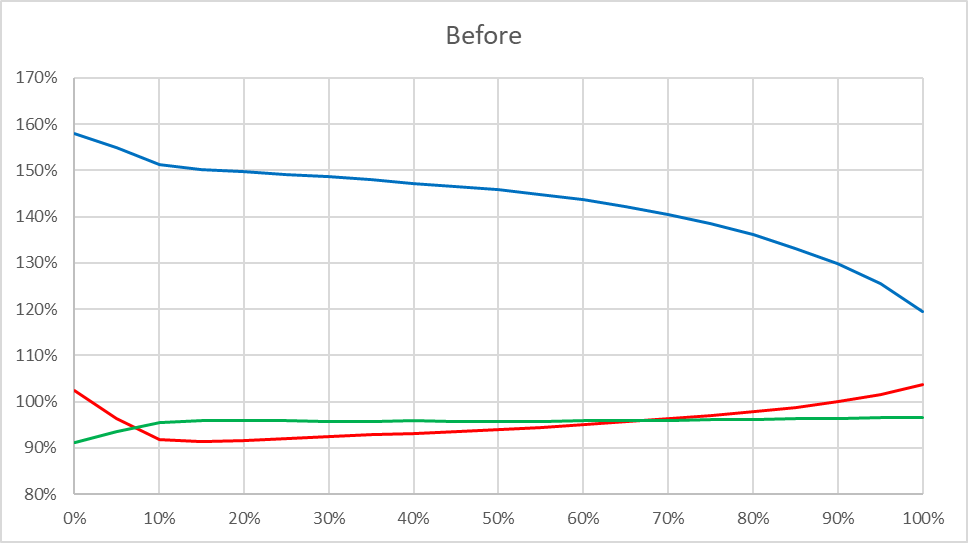
2025-02-26 at 23:51 #143144Looking first at the RGB Balance I noticed the display before calibration was very cold:
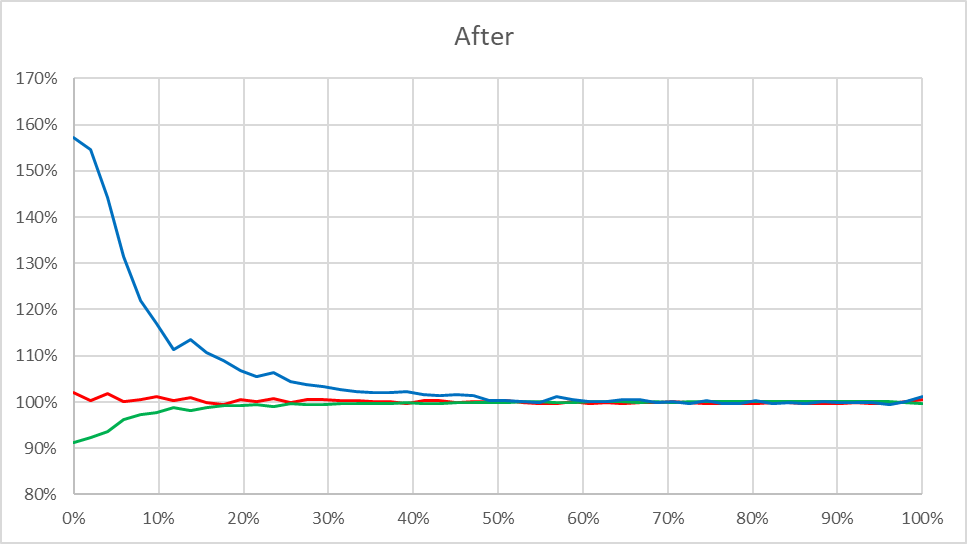
but the 1D LUTs stored in VCGT do a decent job at reducing it:
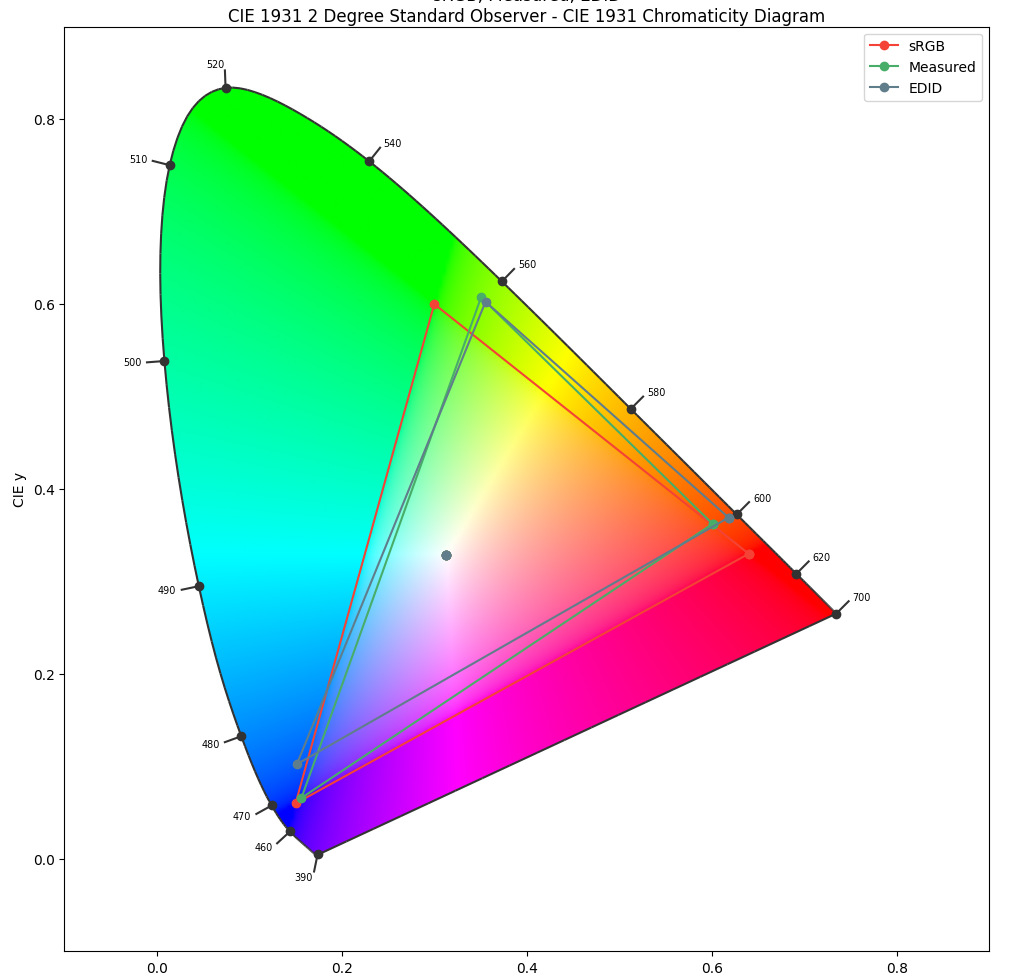
Next I looked at the display gamut and noticed a big discrepancy between the measured primaries and the ones from EDID metadata. Having so bad red and green primaries but close to perfect blue is suspicious so I’m inclined to trust the EDID primaries more.
In this case you need to find a better colorimeter correction and redo everything.
-
This reply was modified 1 year, 4 months ago by DaniJ.
-
This reply was modified 1 year, 4 months ago by DaniJ.
Attachments:
You must be logged in to view attached files.2025-03-01 at 1:57 #143152Yes, my display’s colors did originally have a blue tint. It’s strange, though, because when I first got my laptop new from the store, it came with Windows 7 pre-installed, and the colors with that OS were decent. It was only when I installed my Linux Mint OS that my screen took on the tint. Could this (plus my laptop being nearing 11 years old) perhaps be why the measured primaries in the chart differ as they do from the EDID ones? Or are the measured primaries still suspicious, especially since my display was last reported as only having about 72% sRGB coverage?
In the case that you would still recommend a different correction, could I ask which one you think might be best? The attached picture shows the three that DisplayCal is able to find for my particular display type and colorimeter (the spectral correction being the one that I had used), and I read that ‘Spectral: LCD White LED Family (AC, LG, Samsung)’ was what I should go with otherwise.
Also, can I ask how you came by those charts that you shared?
Attachments:
You must be logged in to view attached files.2025-03-01 at 12:06 #143154I drew the charts myself from information extracted from the profile and previous reports.
The operating system shouldn’t influence the results.
Can you post the measurements (red, green, blue & white) without any correction selected? I should be then able to calculate a correction matrix using the EDID data as reference.
2025-03-02 at 5:13 #143155Thank you, that’s very generous.
Apologies for my ignorance, but in order to provide the information that you’ve asked for, do I need to create a new ICC profile using the exact same settings as the old one, except with no correction applied (and perhaps many fewer patches also)?
2025-03-02 at 11:48 #143157Yes, that would be the easiest way.
2025-03-04 at 2:36 #143161Okay, the attached ICC was created with no correction and 79 patches, and I believe the rest of the settings were the same as the original ICC.
Attachments:
You must be logged in to view attached files.2025-03-05 at 0:26 #143164 -
This reply was modified 1 year, 5 months ago by
-
AuthorPosts
